Share your game live — no app, no account, just a link
Tap "Go Live" while you score and grandparents, family, and teammates can follow every pitch from wherever they are. They open a link in their browser and watch a real-time scorecard update as you record each play — nothing to install, nothing to sign up for.
Built for the person watching from the car, the couch, or another state
The scorekeeper's device stays in full control. Everyone else just watches.
Just a link
Copy the spectator link and text or email it to anyone. No app store, no download.
No account for viewers
Open the link in any browser and the game appears — no sign-up, no login screen.
Read-only, by design
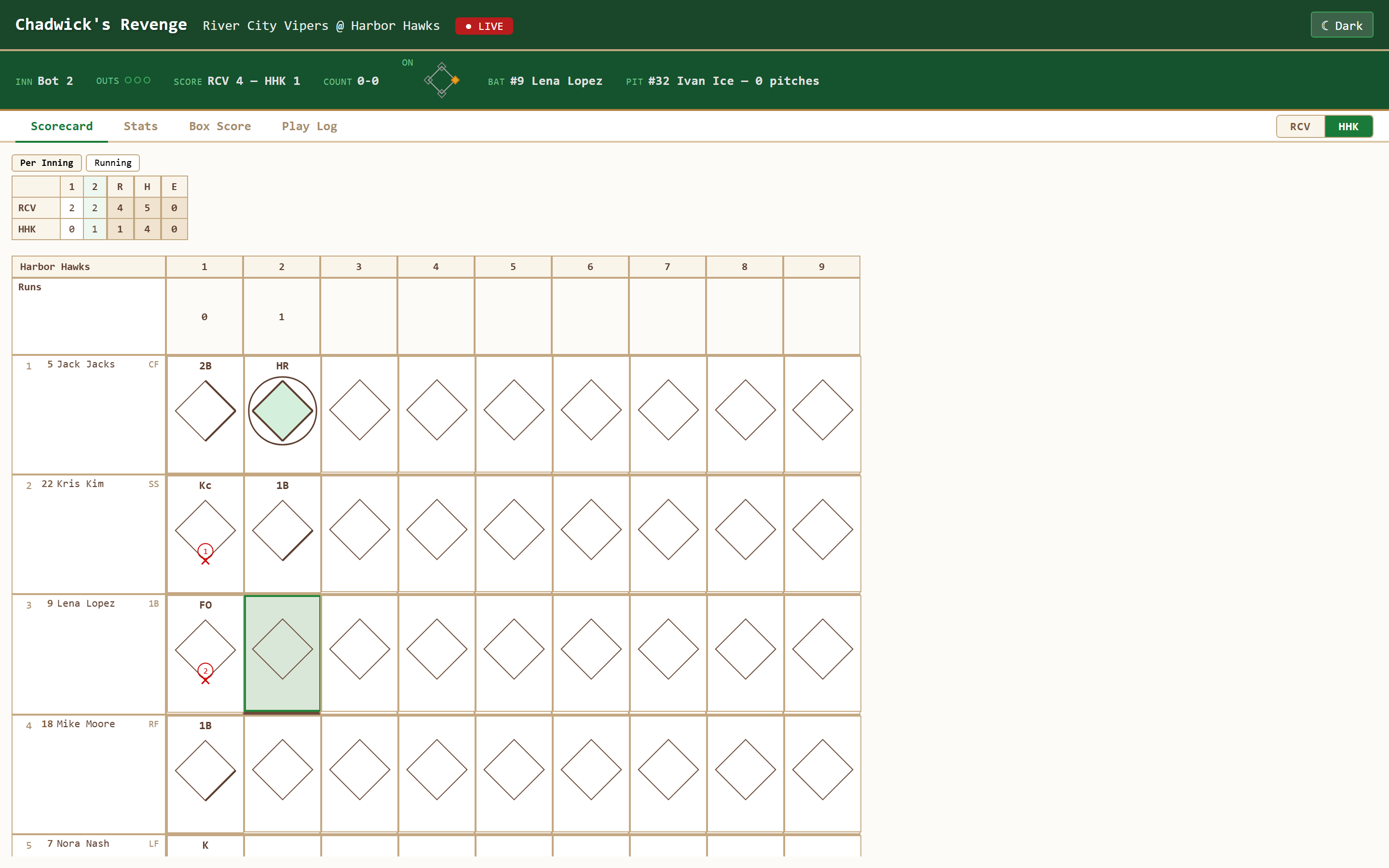
Viewers see the scorecard, stats, and box score update live, but can't change a single play.
Public or unlisted
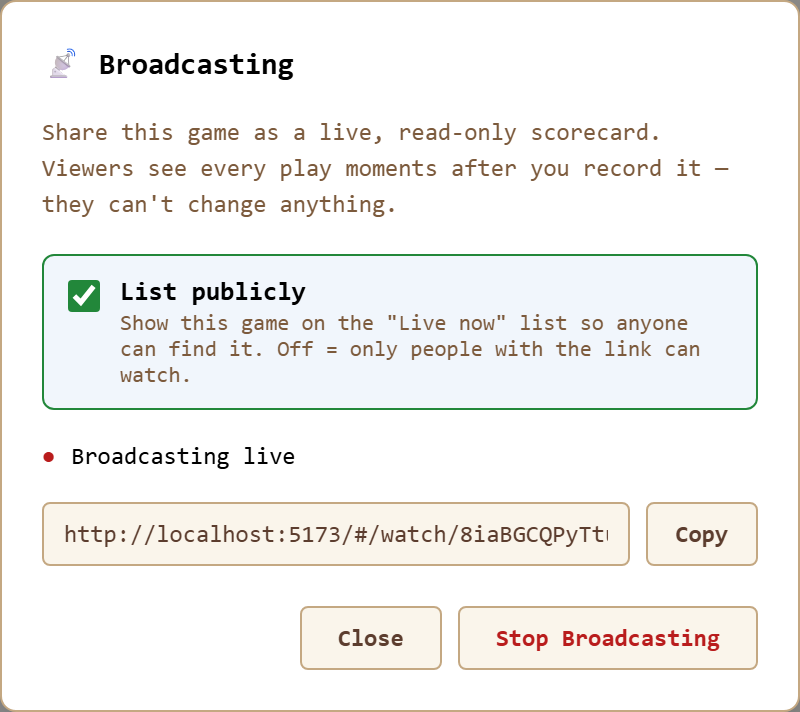
List the game on the "Live now" list so anyone can find it, or keep it unlisted so only your link works.
Moments behind live
Plays appear for viewers moments after you record them — close enough to feel like watching the game.
Completely free
Broadcasting and watching cost nothing, with no viewer limit and no subscription.
What a viewer sees
The same scorecard, stats, box score, and play log you're building — live, in their browser, with a badge showing the game is in progress.
How to go live
- Start scoring your game as you normally would.
- Open the menu and tap "Go Live." Choose whether to list it publicly.
- Copy the link and send it to whoever wants to follow along.
- Keep scoring. Every play you record appears for viewers moments later. Tap "Stop Broadcasting" whenever you're done.
A free live scorecard for the whole family
A grandparent at home can follow the same inning grid you are keeping at the field. A parent arriving late can check the line score and see how a run scored. Nobody watching needs to learn the scoring controls: the link opens a read-only view of your scorecard, player stats, box score, and play log. You keep control of the original game.
This is live scorekeeping, not a video broadcast. The updates describe what the scorekeeper records. If you are a play behind, the spectators are a play behind too. Record the result and runner advances accurately, then correct any mistake in its scorecard cell; the updated state is shared with viewers.
Before the first pitch
Open the scorekeeper, set the game type, and confirm both lineups. Baseball, softball, and Little League games use the same sharing controls. Check your connection before starting a broadcast and open the spectator link on another device to confirm the matchup.
Choose public or unlisted
Leave the public-list option off when you want to distribute the link yourself. An unlisted game does not appear in the Live now list, but anyone who obtains or receives the link can view it and forward it. It is not a password-protected room. Use player names and game details you are comfortable sharing, especially for youth teams.
During the game
Keep the scoring page open. Spectators can switch among the scorecard, stats, box score, and play log without disturbing your view. They cannot enter plays, undo your work, or change the lineup. If someone says the score looks wrong, check the play in your own book and make the correction there.
What happens when the field loses service?
Once the app has loaded, you can keep scoring offline. Your plays remain on the scoring device. Live sharing still needs an internet connection: spectators cannot receive new plays while the scorekeeper is offline, and viewers also need service to receive updates.
When the connection returns, the broadcast publisher retries with the latest game state so spectators can catch up. It shares the current scorecard rather than replaying every missed update as a separate notification. Check the live status before assuming everyone has the latest score. If a link stops working, reopen Go Live and check the broadcast.
The relay is temporary, not a permanent online game archive. Stopping a broadcast, switching games, or an expired relay session can end access through that link. The locally saved game remains on your scoring device, subject to its browser storage.
Free sharing and local saves, with no countdown
Chadwick’s Revenge charges $0 to score or follow a live scorecard. There is no subscription or account gate for either side. Saved games have no time-based expiry on this device. Keep a separate game-file backup or filled PDF: clearing site data, private browsing cleanup, or device loss can remove local games.
As checked September 21, 2026, Dugout Edge Game Day says its free local game clears after about a day, reopening saved games requires a subscription, and live parent follow-along is Premium. It now has a traditional diamond grid as well as PDF/CSV box-score export; the difference here is what is included free and how you work in the editable card.
GameChanger offers five free baseball or softball video-stream views and additional fan features starting at $9.99/month or $39.99/year. Video viewing is a different feature from our live scorecard. GameChanger remains a useful choice for video, messaging, schedules, and team management. See the full comparison for those tradeoffs.
Keep a finished card after the last out
Before stopping the broadcast, make any final scoring corrections and check the line score. In the scoring app, select Download PDF, choose Scorecard and any optional Stats, Box Score, or Play Log sections, then download. The filled file is created on your device and can be printed or sent to family later.
That file is a snapshot, not a continuing live link. If you correct a play afterward, download an updated copy. For paper scoring, the blank baseball scorecard is a separate download. For a first game, keep the symbols reference and worked scoring examples nearby.
Live scorekeeping questions
Do viewers need an app or account?
No. Anyone with the link can watch in any web browser, on a phone, tablet, or computer — nothing to install, nothing to sign up for.
Is this free?
Yes. Broadcasting a game and watching one are both completely free, with no cap on the number of viewers.
Can a viewer change the score?
No. Viewers get a read-only scorecard. Only the device that's actually scoring the game can record plays.
Does the game have to be public?
No. Leave "List publicly" off to keep the game unlisted — anyone who has the link can watch.
Let the people who can't be there watch anyway
Score your next game in Chadwick's Revenge, tap Go Live, and send the link — free and in your browser.
Open the Scorekeeper