How to keep score in softball
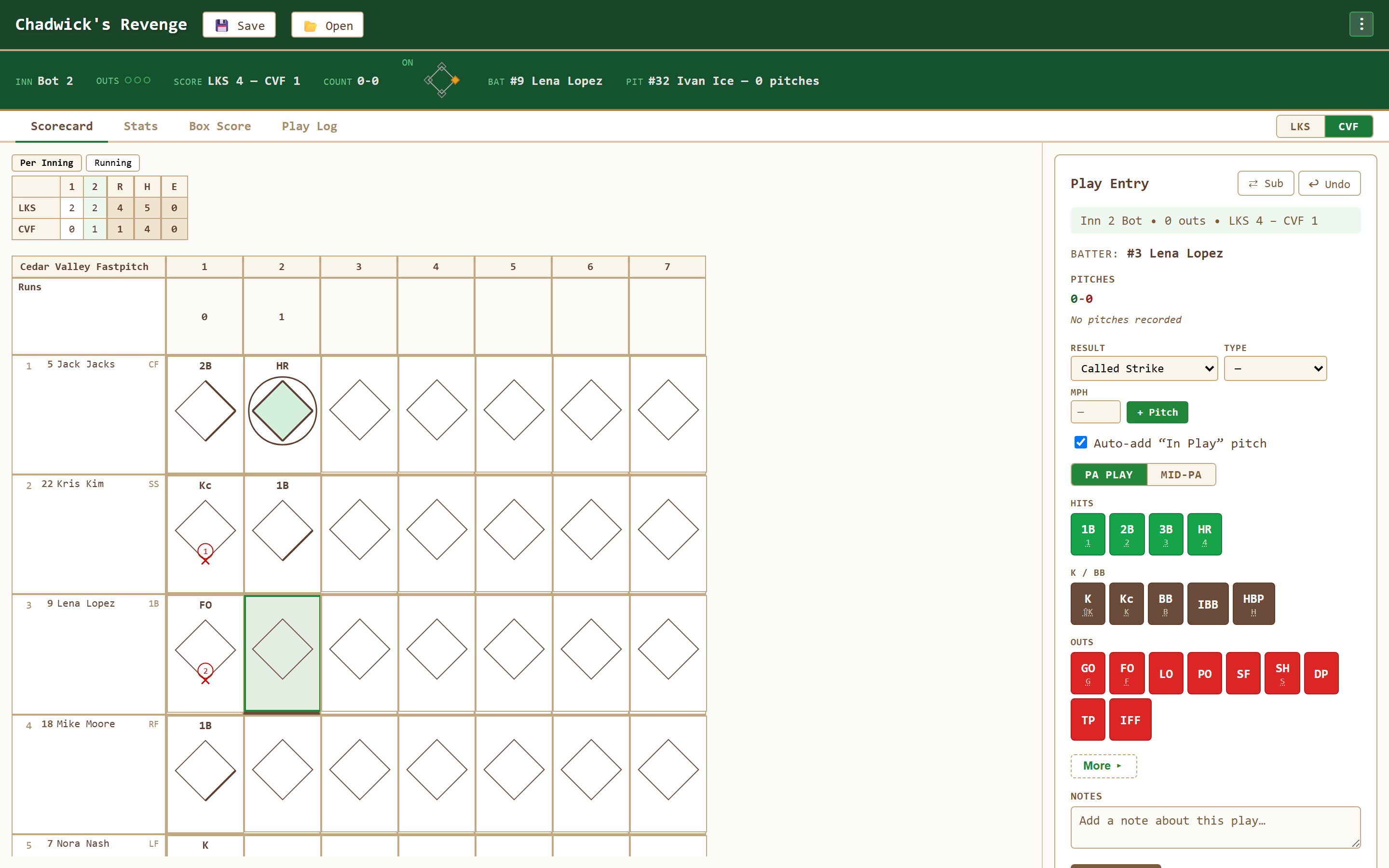
Softball scorekeeping shares baseball's diamond scorecard and familiar hit and out symbols. This guide explains the basics, then shows how to set up slow pitch lineups with an optional Short Fielder (SF) and Extra Hitters (EH).
Start with familiar scorecard notation
Position numbers 1–9, hit symbols like 1B and HR, outs like 6-3 and F8, and the diamond-per-cell layout carry over from baseball. In Chadwick's Revenge, an enabled Short Fielder uses position 10 in fielding notation. New to the basics? Read the baseball scorekeeping guide or the scorecard symbols reference.
Short Fielder vs. Extra Hitter
| Lineup option | How it works in the scorekeeper |
|---|---|
| SF | The Short Fielder bats and plays defense as the tenth fielder. Record putouts, assists, and errors for this player. |
| EH | An Extra Hitter bats without a defensive position. Add multiple Extra Hitters, with a separate count for each team. |
| Both or neither | Enable Short Fielder and Extra Hitters independently. Both options start off, so choose the ones your game uses. |
How to set up a slow pitch softball lineup
- Choose Softball in Game Configuration. Adjust Scheduled Innings as needed; the softball default is seven. Set DH Rule to None if the pitcher will bat.
- Enable Allow Short Fielder (SF) for ten-player defense. Each team's lineup gets a tenth batting slot with SF selected.
- Enable Allow Extra Hitters (EH) if your game uses batting-only players. You can enable EH with or without SF.
- Enter both lineups. Use Add Extra Hitter for each additional batter on that team. Drag players into the batting order you want, including an EH anywhere in the order.
- Confirm and start. The batting order cycles through every player, including all Extra Hitters. Their batting statistics and scorecard rows are included automatically.
If you turn an option off before starting, named players removed from the lineup move to the bench. If your game uses an automatic runner on second in extra innings, enable Designated Runner in Extra Innings separately.
Set up custom league rules
- Select Custom in Game Type. The first selection copies your current setup. Switching back to a standard game type uses its defaults; returning to Custom restores your draft.
- Choose innings and scoring. Enable a run threshold, optional open innings from the final scheduled inning onward, and one mercy lead with its earliest inning. A run-limit ending counts every run on the finishing play, even above the threshold.
- Choose lineup and runner options. Set DH, SF, EH, an automatic runner on second in extras, courtesy runners for pitcher and catcher, and starter re-entry. Courtesy runners are restricted to one use per pitcher or catcher per game; a starter can return once in the original batting slot.
- Set the starting count and foul policy. Choose starting balls (0–3) and strikes (0–2), including 0–0 and 1–1 shortcuts. Ordinary two-strike fouls can be unlimited, an immediate strikeout, or one courtesy foul followed by a strikeout.
- Save and confirm. Name the rules and select Save as New to reuse them on this device. Review the full summary before starting; these rules stay fixed for that game.
When pitch tracking reaches ball four or strike three, confirm with Record walk or Record strikeout, or undo the pitch. A foul-rule strikeout is recorded as Kf. The starting count adds no pitches to the pitcher total; a replacement hitter inherits the current count and any used courtesy foul. Manual play entry is also available.
For the mercy rule, a home lead can end the game after the top half of the eligible inning or as soon as it is reached during the bottom half. A visiting lead requires the home team to finish its turn. These are configurable app policies, not a complete rulebook for any sanctioning organization.
How to score a play by the Short Fielder
In Fielding Credit, select 10 SF. A flyout caught by the Short Fielder appears as F10. A throw from the Short Fielder to first base for an out appears as 10-3; an error appears as E10. Extra Hitters appear as EH in the lineup and are not offered as defenders in Fielding Credit.
See the softball scorekeeper for the feature overview, or learn how to print an expanded softball scorecard.
Softball scorekeeping questions
Can I save custom league rules?
Yes. Select Custom in the Game Type dropdown to choose innings, DH, Short Fielder, Extra Hitters, run limits, open innings, a mercy rule, runners, starter re-entry, starting counts, and two-strike foul rules. Save a named preset on this device for future games. Existing games keep their own rules; the Rules view, live viewers, and printed scorecards show that snapshot.
Does it support slow pitch softball?
Yes. Choose Softball in Game Configuration, then enable Allow Short Fielder (SF), Allow Extra Hitters (EH), or both. Both options default to off. Short Fielder adds a tenth defensive player; Extra Hitters lets each team add multiple batting-only players with Add Extra Hitter during lineup setup.
Is softball notation different from baseball?
Most symbols and the diamond layout are shared. For slow pitch in this app, SF identifies the Short Fielder in the lineup, position 10 identifies that defender in plays such as F10, and EH identifies a batting-only Extra Hitter.
How do I mark the international tiebreaker runner?
If your game uses a runner on second at the start of extra innings, enable Designated Runner in Extra Innings during setup. The app places the automatic runner when the extra half-inning starts.
Does Chadwick's Revenge support softball rules?
Choose Softball for a seven-inning default, adjustable innings and DH rule, courtesy runners, and optional SF and EH lineups. The extra-inning runner is a separate setting. See the softball scorekeeper page for the available options.
Learn by doing
The fastest way to learn softball scorekeeping is to score a game. Open Chadwick's Revenge and let it place the symbols while you follow along — free and in your browser.
Open the Scorekeeper