A Little League scorekeeper built for volunteer parents
Start with the Little League game type for six innings and no DH, or select Custom to choose your league's run limits, mercy rule, and starter re-entry. Keep a classic scorecard, track pitches, and print the result without an account.
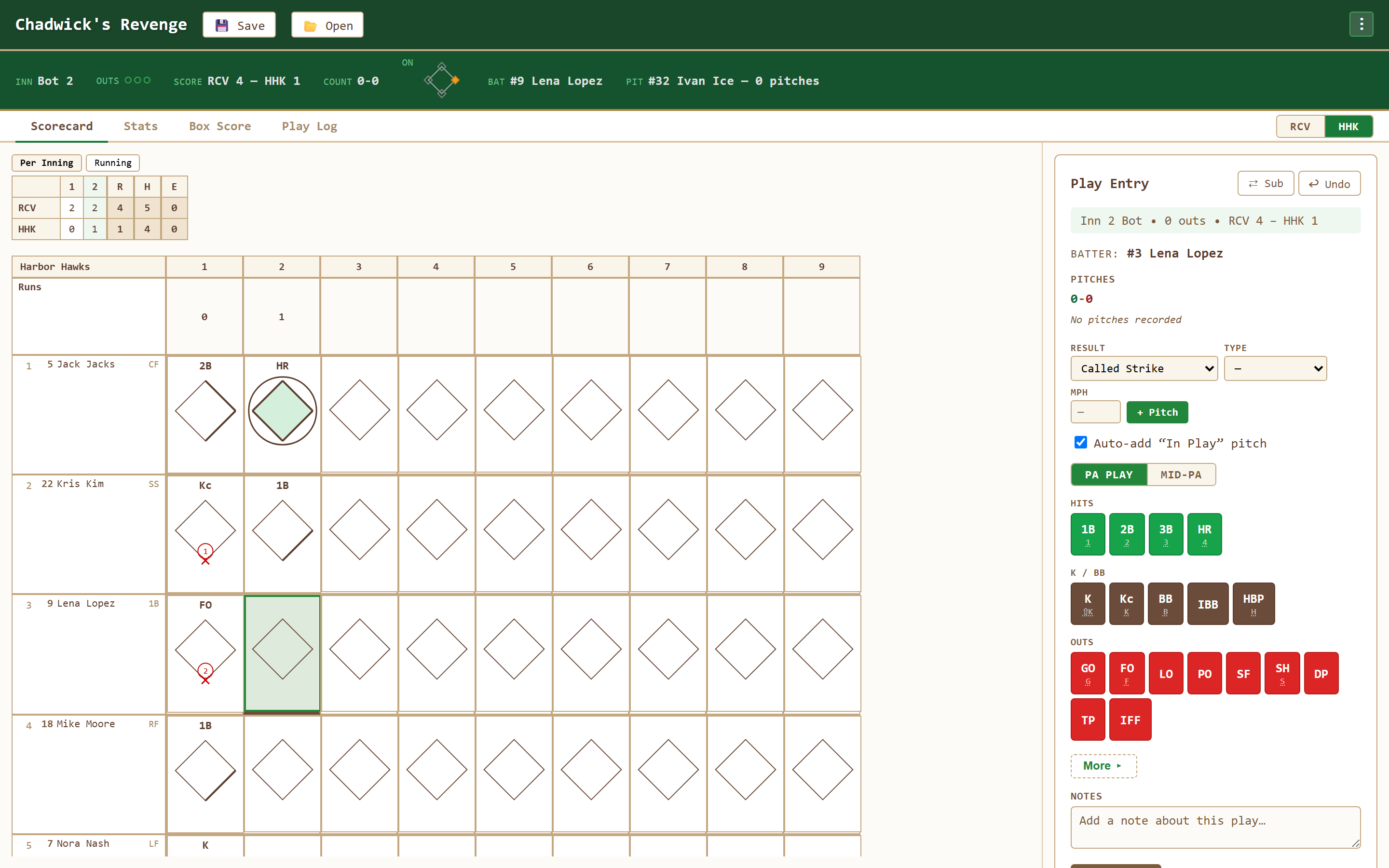
Set up the game your team plays
Choose Little League for the standard six-inning setup. Choose Custom for additional league rules and saved presets.
6-inning games
Scheduled length matches Little League Majors play, not a 9-inning MLB template.
Run limit per inning
Select Custom to enable a run threshold. All runs on the finishing play count, even above the threshold.
The run rule
Select Custom to choose one mercy lead and the earliest qualifying inning. Review the displayed home/visitor ending policy.
Pitch counts
Record individual pitches to track pitcher totals. New-game setup does not configure pitch limits or rest schedules.
Optional starter re-entry
Enable starter re-entry in Custom: one return to the original batting-order slot.
Tablet-first design
Big touch targets make it easy to keep score from the dugout or the stands.
Standard setup and Custom choices
The Little League setup starts with the settings below. To add league rules, switch to Custom and review every choice before starting. The app does not implement every rule of a named league organization.
| Rule | Setup behavior |
|---|---|
| Game length | 6 innings |
| Run limit per inning | Off by default; configurable in Custom |
| Run rule | Off by default; configurable in Custom |
| Pitch count limit | Not configured by new-game setup |
| Mandatory rest | Not configured by new-game setup |
| Re-entry | Off by default; enable one return in Custom |
New to scorekeeping? Read our guide to keeping score in baseball — the same notation applies to Little League games.
An independent scorecard for your league
GameChanger is Little League’s officially authorized scorekeeping app and official pitch-count technology. Chadwick’s Revenge is an independent option for keeping your own traditional book, not an affiliated or authorized replacement. Follow your league’s instructions for the official record.
Pitch-count and rest reference: regular-season baseball
Daily limits by league age: 6–8: 50; 9–10: 75; 11–12: 85; 13–16: 95. Softball uses different pitching rules. The following is a reference, not automatic eligibility enforcement.
| Rest days | Age 14 and under | Age 15–16 |
|---|---|---|
| 0 | 1–20 pitches | 1–30 pitches |
| 1 | 21–35 | 31–45 |
| 2 | 36–50 | 46–60 |
| 3 | 51–65 | 61–75 |
| 4 | 66+ | 76+ |
For example, a 12-year-old with 42 pitches on Monday needs Tuesday and Wednesday off and may pitch Thursday if otherwise eligible. Batter-threshold exceptions, catcher eligibility, and restrictions on consecutive days also apply; consult the official pitching rules. Record pitches individually in the app and reconcile with the designated pitch-count recorder.
The 15-run rule and mandatory play
For six-inning divisions, the 15-run threshold applies after three innings, or after 2½ when the home team leads. Teenage divisions need one more inning. Confirm your league’s adoption and the applicable 10- and 8-run provisions using the official run-rule guide. Custom setup supports one mercy threshold, not the entire multi-threshold rulebook.
Regular-season mandatory play generally requires six defensive outs and one turn at bat for each rostered player present at the start. Tournament rules and exceptions differ. Track entry, exit, defensive outs, and completed batting turns on the companion sheet; the app does not enforce mandatory play. Consult the official regular-season and tournament differences.
Download the Little League game-day worksheet (PDF)
Pair the pitch/rest and participation worksheet with the two-team printable scorecard. Reviewed September 21, 2026; confirm the current rules with your league before each season.
Little League scorekeeping questions
Does it track pitch counts and rest days?
Individual pitch tracking shows pitcher totals. Pitch limits and rest schedules are not configurable in new-game setup; older imported games retain any limits already stored in their rules.
Does it handle the run rule?
Choose Custom in Game Type to enable a per-inning run threshold and one mercy lead with its earliest inning. Standard Little League setup leaves these rules off.
I've never kept score before — is this hard to learn?
Not at all. Tap what happened and the app writes the correct scorecard notation for you, so you learn by watching. See the how-to guide for the basics.
What happens when I make a mistake?
Nothing bad — this is the whole reason to score on a screen instead of in the book. Undo reverses the last play. For anything older, tap the cell and re-enter that at-bat. Totals, pitch counts and the box score all recalculate, so a mis-scored play in the second inning does not follow you to the end of the game.
Ready to score your Little League game?
Open Chadwick's Revenge, choose Little League, and keep a full scorebook — free and in your browser.
Open the Scorekeeper